Continuous Integration
GraphQL Inspector can be used with any Continuous Integration. It's easy!
GraphQL Inspector can be used with any Continuous Integration. It’s easy!
Installation
GraphQL Inspector already has CLI, but we developed a more suited approach for consuming it in CI/CD. It’s called CLI for CI.
Install it using:
You need to install graphql globally too:
The most common use case is schema diffing and all the other features are never touched. That’s why we decide to make each feature pluggable.
In GraphQLI Inspector CLI for CI, you’re able to install exactly what you want to use. Each command is an installable package.
Commands
Here’s a list of available commands. Pick one or a few.
| Command | Package |
|---|---|
graphql-inspector diff ... | @graphql-inspector/diff-command |
graphql-inspector validate ... | @graphql-inspector/validate-command |
graphql-inspector coverage ... | @graphql-inspector/coverage-command |
graphql-inspector similar ... | @graphql-inspector/similar-command |
graphql-inspector introspect ... | @graphql-inspector/introspect-command |
graphql-inspector serve ... | @graphql-inspector/serve-command |
Loaders
“Loader” is a fairly new concept. Since each command is a package, we decided to do the same for schema/document loading logic.
Depending on the source of GraphQL Schema or GraphQL Documents, pick one or few from the list.
| Input | Package |
|---|---|
.graphql, .gql and similar | @graphql-inspector/graphql-loader |
.js, .jsx, .ts, .vue and similar | @graphql-inspector/code-loader |
introspection result .json | @graphql-inspector/json-loader |
| File in Git repository | @graphql-inspector/git-loader |
| File on GitHub | @graphql-inspector/github-loader |
| GraphQL Endpoint | @graphql-inspector/url-loader |
Now you know where everything is but let’s find out how to make use of it.
Usage
Let’s take for example Schema Diffing and assume your latest schema.graphql is under master
branch.
You want to compare two GraphQL Schemas:
You need to be able to load schema.graphql from disk and from origin/master on Git:
With everything installed, you can use the command below in your CI setup:
Example
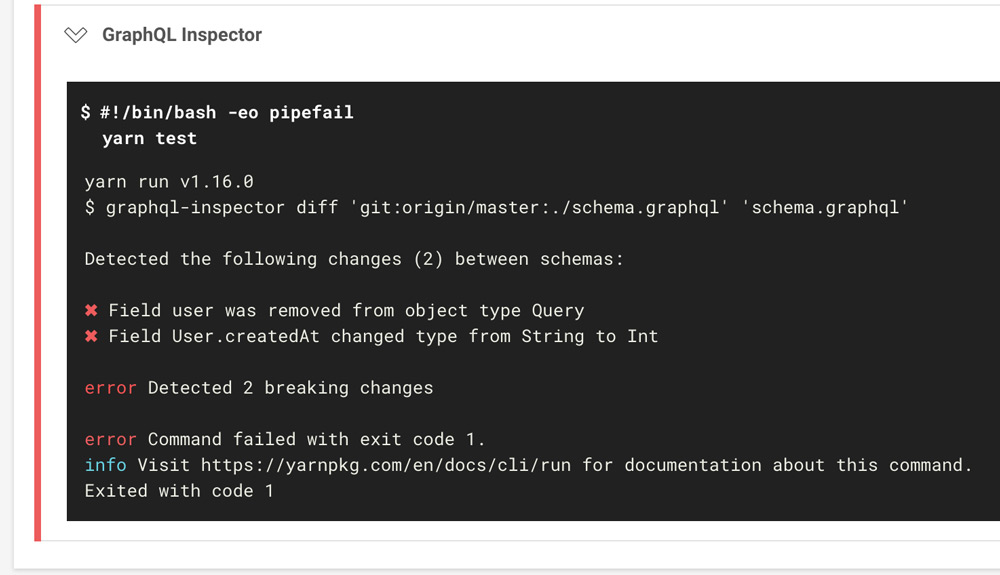
Now, when you push your changes you would see the following:
Recommended Workflow
We recommend to automate the workflow and use husky to run
$ graphql-inspector introspect.
This way your schema.graphql is always in sync with the code, on each commit.
Using Docker Image
You can use GraphQL Inspector Docker image in any CI/CD provider. For example, in CircleCI it would look like this: