GraphQL Code Generator is a tool that generates code from your GraphQL schema and operations. It can generate TypeScript, Flow, Swift, Kotlin, and more.
<script setup lang="ts">
import { computed } from 'vue'
import { useQuery } from '@urql/vue'
import { graphql } from '../src/gql'
import FilmItem from './components/FilmItem.vue'
const { data } = useQuery({
query: graphql(/* GraphQL */ `
query allFilmsWithVariablesQuery($first: Int!) {
  allFilms(first: $first) {
    edges {
      node {
        ...FilmItem
      }
    }
  }
}
`),
// variables are typed!
variables: { first: 10 }
})
// `films` is typed!
const films = computed(() => data.value?.allFilms?.edges?.map(e => e?.node!))
</script>
<template>
<ul>
<li v-for="film of films"><FilmItem :film="film" /></li>
</ul>
</template>
<script setup lang="ts">
import { computed } from 'vue'
import { useQuery } from '@vue/apollo-composable'
import { graphql } from '../src/gql'
import FilmItem from './components/FilmItem.vue'
const { result } = useQuery(
graphql(/* GraphQL */ `
query allFilmsWithVariablesQuery($first: Int!) {
allFilms(first: $first) {
edges {
node {
...FilmItem
}
}
}
}
`),
// variables are typed!
{ first: 10 }
)
// `films` is typed!
const films = computed(() => result.value?.allFilms?.edges?.map(e => e?.node!))
</script>
<template>
<ul>
<li v-for="film of films"><FilmItem :film="film" /></li>
</ul>
</template>
Simply use the provided graphql() function (from ../src/gql/) to define your GraphQL Query or
Mutation, then, get instantly typed-variables and result just by passing your GraphQL document to
your favorite client ✨
Let’s now take a look at how to define our <Film> component using the FilmItem fragment and its
corresponding TypeScript type.
Let’s look at the implementation of our Film UI component in React or Vue:
src/Film.tsx
import { FragmentType, useFragment } from "./gql/fragment-masking";import { graphql } from "../src/gql";export const FilmFragment = graphql(/* GraphQL */ ` fragment FilmItem on Film { id title releaseDate producers }`);const Film = (props: { /* `film` property has the correct type 🎉 */ film: FragmentType<typeof FilmFragment>;}) => { const film = useFragment(FilmFragment, props.film); return ( <div> <h3>{film.title}</h3> <p>{film.releaseDate}</p> </div> );};export default Film;
<script setup lang="ts">
import { graphql } from '.../src/gql'
import { useFragment, type FragmentType } from '../gql/fragment-masking'
const FilmFragment = graphql(/* GraphQL */ `
fragment FilmItem on Film {
  id
  title
  releaseDate
  producers
}
`)
const props = defineProps<{
film: FragmentType<typeof FilmFragment>
}>()
// `filmObj` is typed!
const filmObj = useFragment(FilmFragment, props.film)
</script>
<template>
<div>
<h3>{{ filmObj.title }}</h3>
<p>{{ filmObj.releaseDate }}</p>
</div>
</template>
You will notice that our <FilmItem> component leverages 2 imports from our generated code (from
../src/gql): the FragmentType<T> type helper and the useFragment() function.
we use FragmentType<typeof FilmFragment> to get the corresponding Fragment TypeScript type
later on, we use useFragment() to retrieve the film property
Leveraging FragmentType<typeof FilmFragment> and useFragment() helps keep your UI component
isolated and avoids inheriting the parent GraphQL Query’s typings.
By using GraphQL Fragments, you are explicitly declaring your UI component’s data dependencies and
safely accessing only the data it needs.
Finally, unlike most GraphQL Client setups, you don’t need to append the Fragment definition
document to the related Query. You simply need to reference it in your GraphQL Query, as shown
below:
Congratulations, you now have the best GraphQL front-end experience with fully-typed Queries and
Mutations!
From simple Queries to more advanced Fragments-based ones, GraphQL Code Generator has you covered
with a simple TypeScript configuration file, and without impact on your application bundle size! 🚀
What’s next?
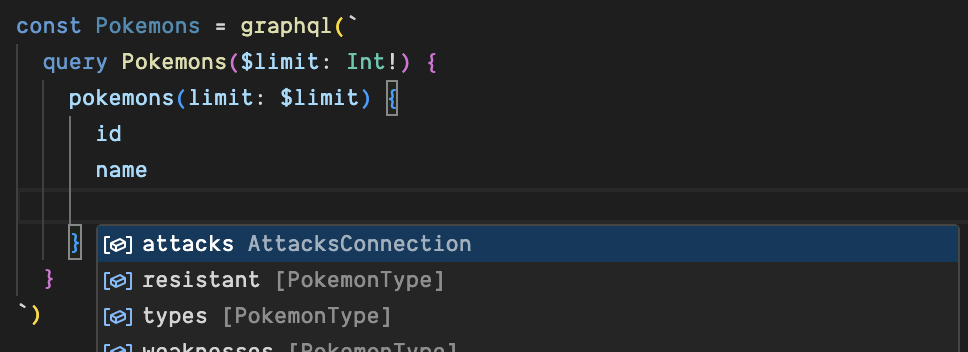
To get the best GraphQL development experience, we recommend installing the
GraphQLSP package to get:
syntax highlighting
autocomplete suggestions
validation against schema
quick-info on hover
GraphQLSPs a TypeScript LSP plugin for GraphQL, to get it working, we need to add the following to
your tsconfig.json after installing the package (npm i -D @0no-co/graphqlsp):
Last but not least you need to ensure that when you’re using VSCode that the workspace version of
TS is used, the following config will make a prompt appear to switch it when visiting a TS file
Also, make sure to follow GraphQL best practices by using
graphql-eslint and the
ESLint VSCode extension
to visualize errors and warnings inlined in your code correctly.
Feel free to continue playing with this demo project, available in all flavors, in our
repository examples folder.
Config API
The client preset allows the following config options:
scalars: Extends or overrides the built-in scalars and
custom GraphQL scalars to a custom type.
defaultScalarType: Allows you to override
the type that unknown scalars will have. Defaults to any.
strictScalars: If scalars are found in the
schema that are not defined in scalars an error will be thrown during codegen.
namingConvention: Available case functions in
change-case-all are camelCase, capitalCase, constantCase, dotCase, headerCase,
noCase, paramCase, pascalCase, pathCase, sentenceCase, snakeCase, lowerCase,
localeLowerCase, lowerCaseFirst, spongeCase, titleCase, upperCase, localeUpperCase and
upperCaseFirst.
skipTypename: Does not add __typename to the
generated types, unless it was specified in the selection set.
arrayInputCoercion: The
GraphQL spec allows arrays and a single
primitive value for list input. This allows to deactivate that behavior to only accept arrays
instead of single values.
enumsAsTypes: Generates enum as TypeScript string
union type instead of an enum. Useful if you wish to generate .d.ts declaration file instead
of .ts, or if you want to avoid using TypeScript enums due to bundle size concerns.
enumsAsConst: Generates enum as TypeScript const
assertions instead of enum. This can even be used to enable enum-like patterns in plain JavaScript
code if you choose not to use TypeScript’s enum construct.
enumValues: Overrides the default value of enum
values declared in your GraphQL schema. You can also map the entire enum to an external type by
providing a string that of module#type.
nonOptionalTypename: Automatically adds
__typename field to the generated types, even when they are not specified in the selection set,
and makes it non-optional.
avoidOptionals: This will cause the generator
to avoid using TypeScript optionals (?) on types.
Appendix I: React Query with a custom fetcher setup
The use of @tanstack/react-query along with graphql-request@^5 is highly recommended due to
GraphQL Code Generator integration with graphql-request@^5.
Create a file with the following helper function within your project:
useGraphQL helper function
import request from 'graphql-request'import { type TypedDocumentNode } from '@graphql-typed-document-node/core'import { useQuery, type UseQueryResult } from '@tanstack/react-query'export function useGraphQL<TResult, TVariables>( document: TypedDocumentNode<TResult, TVariables>, ...[variables]: TVariables extends Record<string, never> ? [] : [TVariables]): UseQueryResult<TResult> { return useQuery([(document.definitions[0] as any).name.value, variables], async ({ queryKey }) => request('https://graphql.org/graphql/', document, queryKey[1] ? queryKey[1] : undefined) )}
Then write type-safe code like the following:
Application Code
import { graphql } from './generated/gql.js'import { useGraphQL } from './use-graphql.js'const allFilmsWithVariablesQueryDocument = graphql(/* GraphQL */ ` query allFilmsWithVariablesQuery($first: Int!) { allFilms(first: $first) { edges { node { title } } } }`)function App() { // `data` is properly typed, inferred from `allFilmsWithVariablesQueryDocument` type const { data } = useGraphQL( allFilmsWithVariablesQueryDocument, // variables are also properly type-checked. { first: 10 } ) // ... further component code}
In case you do not want to use graphql-request with @tanstack/react-query, you can write and
type your own custom fetcher function.
GraphQL Code Generator, via the client preset, generates GraphQL documents similar to the
following:
A TypedDocumentNode<R, V> type carry 2 Generic arguments: the type of the GraphQL result R and
the type of the GraphQL operation variables V.
To implement your own React Query fetcher while preserving the GraphQL document type inference, it
should implement a function signature that extract the result type and use it as a return type, as
showcased below:
Custom fetcher function and useGraphQL hook implementation
import { print, type ExecutionResult } from 'graphql'import { type TypedDocumentNode } from '@graphql-typed-document-node/core'import { useQuery, type UseQueryResult } from '@tanstack/react-query'/** Your custom fetcher function */async function customFetcher<TResult, TVariables>( url: string, document: TypedDocumentNode<TResult, TVariables>, ...[variables]: TVariables extends Record<string, never> ? [] : [TVariables]): Promise<TResult> { const response = await fetch(url, { method: 'POST', headers: { 'content-type': 'application/json' }, body: JSON.stringify({ query: print(document), variables }) }) if (response.status !== 200) { throw new Error(`Failed to fetch: ${response.statusText}. Body: ${await response.text()}`) } return await response.json()}export function useGraphQL<TResult, TVariables>( document: TypedDocumentNode<TResult, TVariables>, ...[variables]: TVariables extends Record<string, never> ? [] : [TVariables]): UseQueryResult<ExecutionResult<TResult>> { return useQuery([(document.definitions[0] as any).name.value, variables], () => customFetcher('https://graphql.org/graphql/', document, variables) )}
Then write type-safe code like the following:
Application Code
import { graphql } from './generated/gql.js'import { useGraphQL } from './use-graphql.js'const allFilmsWithVariablesQueryDocument = graphql(/* GraphQL */ ` query allFilmsWithVariablesQuery($first: Int!) { allFilms(first: $first) { edges { node { title } } } }`)function App() { // `data` is properly typed, inferred from `allFilmsWithVariablesQueryDocument` type const { data } = useGraphQL( allFilmsWithVariablesQueryDocument, // variables are also properly type-checked. { first: 10 } ) // ... further component code}
Appendix II: Compatibility
GraphQL Code Generator client preset (@graphql-codegen/client-preset) is compatible with the
following GraphQL clients and frameworks:
React
@apollo/client (since 3.2.0, not when using React Components (<Query>))